Apr
07
2007
Last time I made an example of how to enumerate windows. This time I present to you a class that greatly simplifies the process of searching for specific windows, types of windows, windows belonging to a specific process, having a specific text. You can search for any number of these parameters at the same time, using regular expressions for all string matches to provide optimal flexibility.
using System.Runtime.InteropServices;
using System;
using System.Text;
using System.Text.RegularExpressions;
using System.Diagnostics;

namespace Searching_for_windows
{
	class Program
	{
		// Win32 constants.
		const int WM_GETTEXT = 0x000D;
		const int WM_GETTEXTLENGTH = 0x000E;

		// Win32 functions that have all been used in previous blogs.
		[DllImport("User32.Dll")]
		private static extern void GetClassName(int hWnd, StringBuilder s, int nMaxCount);

		[DllImport("User32.dll")]
		private static extern int GetWindowText(int hWnd, StringBuilder text, int count);

		[DllImport("User32.dll")]
		private static extern Int32 SendMessage(int hWnd, int Msg, int wParam, StringBuilder lParam);

		[DllImport("User32.dll")]
		private static extern Int32 SendMessage(int hWnd, int Msg, int wParam, int lParam);

		// Main entrypoint function
		static void Main(string[] args)
		{
			WindowFinder wf = new WindowFinder();

			// Find all Internet Explorer instances
			wf.FindWindows(0, null, null, new Regex("iexplore"), new WindowFinder.FoundWindowCallback(foundWindow));

			// Find all visual studio instances
			wf.FindWindows(0, null, new Regex(" - Microsoft Visual Studio"), new Regex("devenv"), new WindowFinder.FoundWindowCallback(foundWindow));

			Console.WriteLine("Done");
			Console.Read();
		}

		// Gets called each time a window is found by the WindowFinder class.
		private static bool foundWindow(int handle)
		{
			// Print the window info.
			printWindowInfo(handle);

			// Continue on with next window.
			return true;
		}

		// Prints basic properties of a window, uses function already used in previous blogs.
		private static void printWindowInfo(int handle)
		{
			// Get the class.
			StringBuilder sbClass = new StringBuilder(256);
			GetClassName(handle, sbClass, sbClass.Capacity);

			// Get the text.
			int txtLength = SendMessage(handle, WM_GETTEXTLENGTH, 0, 0);
			StringBuilder sbText = new StringBuilder(txtLength + 1);
			SendMessage(handle, WM_GETTEXT, sbText.Capacity, sbText);

			// Now we can write out the information we have on the window.
			Console.WriteLine("Handle: " + handle);
			Console.WriteLine("Class : " + sbClass);
			Console.WriteLine("Text  : " + sbText);
			Console.WriteLine();
		}
	}

	/// <summary>
	/// A class used for finding windows based upon their class, title, process and parent window handle.
	/// </summary>
	public class WindowFinder
	{
		// Win32 constants.
		const int WM_GETTEXT = 0x000D;
		const int WM_GETTEXTLENGTH = 0x000E;

		// Win32 functions that have all been used in previous blogs.
		[DllImport("User32.Dll")]
		private static extern void GetClassName(int hWnd, StringBuilder s, int nMaxCount);

		[DllImport("User32.dll")]
		private static extern int GetWindowText(int hWnd, StringBuilder text, int count);

		[DllImport("User32.dll")]
		private static extern Int32 SendMessage(int hWnd, int Msg, int wParam, StringBuilder lParam);

		[DllImport("User32.dll")]
		private static extern Int32 SendMessage(int hWnd, int Msg, int wParam, int lParam);

		[DllImport("user32")]
		private static extern int GetWindowThreadProcessId(int hWnd, out int lpdwProcessId);

		// EnumChildWindows works just like EnumWindows, except we can provide a parameter that specifies the parent
		// window handle. If this is NULL or zero, it works just like EnumWindows. Otherwise it'll only return windows
		// whose parent window handle matches the hWndParent parameter.
		[DllImport("user32.Dll")]
		private static extern Boolean EnumChildWindows(int hWndParent, PChildCallBack lpEnumFunc, int lParam);

		// The PChildCallBack delegate that we used with EnumWindows.
		private delegate bool PChildCallBack(int hWnd, int lParam);

		// This is an event that is run each time a window was found that matches the search criterias. The boolean
		// return value of the delegate matches the functionality of the PChildCallBack delegate function.
		private event FoundWindowCallback foundWindow;
		public delegate bool FoundWindowCallback(int hWnd);

		// Members that'll hold the search criterias while searching.
		private int parentHandle;
		private Regex className;
		private Regex windowText;
		private Regex process;

		// The main search function of the WindowFinder class. The parentHandle parameter is optional, taking in a zero if omitted.
		// The className can be null as well, in this case the class name will not be searched. For the window text we can input
		// a Regex object that will be matched to the window text, unless it's null. The process parameter can be null as well,
		// otherwise it'll match on the process name (Internet Explorer = "iexplore"). Finally we take the FoundWindowCallback
		// function that'll be called each time a suitable window has been found.
		public void FindWindows(int parentHandle, Regex className, Regex windowText, Regex process, FoundWindowCallback fwc)
		{
			this.parentHandle = parentHandle;
			this.className = className;
			this.windowText = windowText;
			this.process = process;

			// Add the FounWindowCallback to the foundWindow event.
			foundWindow = fwc;

			// Invoke the EnumChildWindows function.
			EnumChildWindows(parentHandle, new PChildCallBack(enumChildWindowsCallback), 0);
		}

		// This function gets called each time a window is found by the EnumChildWindows function. The foun windows here
		// are NOT the final found windows as the only filtering done by EnumChildWindows is on the parent window handle.
		private bool enumChildWindowsCallback(int handle, int lParam)
		{
			// If a class name was provided, check to see if it matches the window.
			if (className != null)
			{
				StringBuilder sbClass = new StringBuilder(256);
				GetClassName(handle, sbClass, sbClass.Capacity);

				// If it does not match, return true so we can continue on with the next window.
				if (!className.IsMatch(sbClass.ToString()))
					return true;
			}

			// If a window text was provided, check to see if it matches the window.
			if (windowText != null)
			{
				int txtLength = SendMessage(handle, WM_GETTEXTLENGTH, 0, 0);
				StringBuilder sbText = new StringBuilder(txtLength + 1);
				SendMessage(handle, WM_GETTEXT, sbText.Capacity, sbText);

				// If it does not match, return true so we can continue on with the next window.
				if (!windowText.IsMatch(sbText.ToString()))
					return true;
			}

			// If a process name was provided, check to see if it matches the window.
			if (process != null)
			{
				int processID;
				GetWindowThreadProcessId(handle, out processID);

				// Now that we have the process ID, we can use the built in .NET function to obtain a process object.
				Process p = Process.GetProcessById(processID);

				// If it does not match, return true so we can continue on with the next window.
				if (!process.IsMatch(p.ProcessName))
					return true;
			}

			// If we get to this point, the window is a match. Now invoke the foundWindow event and based upon
			// the return value, whether we should continue to search for windows.
			return foundWindow(handle);
		}
	}
}
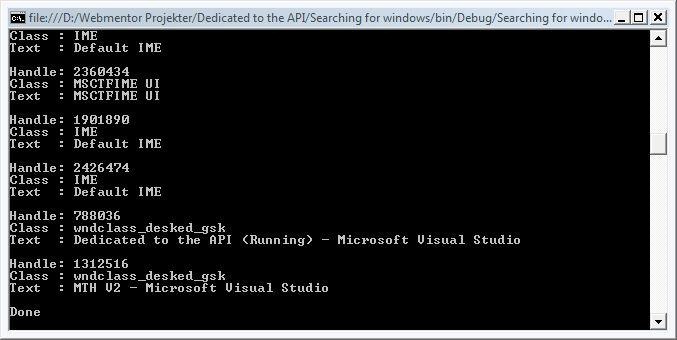
And the result:
Mark S. Rasmussen