I got quite a lot of comments for my XmlDocument fluent interface, and I’m very glad I did. I’m always open towards new ways to solve problems, and I got a couple of suggestions to my post that I afterwards experimented with. One of those is using the XmlSerializer to serialize strongly typed classes (or structs - performance is the same) into XML. Jon von Gillern originally suggested it, but Kris Vandermotten made me want to test it out.
There are two aspects of these solutions, one is readability & maintanability, the other is pure performance. I said that my XmlDocument wrapper would be a lot faster than the serialization way using Reflection, but Kris wasn’t so sure. Admittedly, I hadn’t tested it out, so I though I might actually be wrong in that assumption. Let the testing commence.
I’ll be using my User XML snippet as an example. This is how the XML is generated using my API:
XmlOutput xo = new XmlOutput()
	.XmlDeclaration()
	.Node("root").Within()
		.Node("user").Within()
			.Node("username").InnerText("orca")
			.Node("realname").InnerText("Mark S. Rasmussen")
			.Node("description").InnerText("I'll handle any escaping (like < & > for example) needs automagically.")
			.Node("articles").Within()
				.Node("article").Attribute("id", "25").InnerText("Handling DBNulls")
				.Node("article").Attribute("id", "26").InnerText("Accessing my privates")
				.EndWithin()
			.Node("hobbies").Within()
				.Node("hobby").InnerText("Fishing")
				.Node("hobby").InnerText("Photography")
				.Node("hobby").InnerText("Work");

string output = xo.GetOuterXml();
Note that I just retrieve the complete XML in a string, I don’t print or save this, it’s just to get a valid comparison point. This is how we’ll generate the same code using the XmlSerializer:
public class User
{
	public string Username;
	public string Realname;
	public string Description;
	public List<Article> Articles;
	public List<Hobby> Hobbies;
}

public class Article
{
	[XmlAttribute]
	public int ID;

	[XmlText]
	public string Content;
}

public class Hobby
{
	[XmlText]
	public string Content;
}
public static string ConvertToXml(object item)
{
	XmlSerializer xmlser = new XmlSerializer(item.GetType());

	using (MemoryStream ms = new MemoryStream())
	{
		xmlser.Serialize(ms, item);
		UTF8Encoding textconverter = new UTF8Encoding();
		return textconverter.GetString(ms.ToArray());
	}
}
User user = new User();
user.Username = "orca";
user.Realname = "Mark S. Rasmussen";
user.Description = "I'll handle any escaping (like < & > for example) needs automagically.";

user.Articles = new List<Article>();
user.Articles.Add(new Article() { ID = 25, Content = "Handling DBNulls" });
user.Articles.Add(new Article() { ID = 26, Content = "Accessing my privates"});

user.Hobbies = new List<Hobby>();
user.Hobbies.Add(new Hobby() { Content = "Fishing" });
user.Hobbies.Add(new Hobby() { Content = "Photography" });
user.Hobbies.Add(new Hobby() { Content = "Work" });

string output = ConvertToXml(user);
Note that only the last codesnippet is the one being looped, the other two are simply one-time helpers to actually create the XML. I have run the tests in a number of iterations to get a total code time, furthermore, I’ve run each of the iteration tests 10 times to calculate the average execution time. This is the basic code to run the tests:
sw.Reset();
iterationTime = 0;
for (int testIteration = 0; testIteration < testIterations; testIteration++)
{
	sw.Start();
	for (int i = 0; i < iterations; i++)
	{
		// Perform XML creation
	}
	sw.Stop();
	iterationTime += sw.ElapsedMilliseconds;
	Console.WriteLine(sw.ElapsedMilliseconds);

	sw.Reset();
}
Console.WriteLine("Total XmlSerializer: " + iterationTime / testIterations);
And finally, the results (times in ms on a base 10 logarithmic scale):
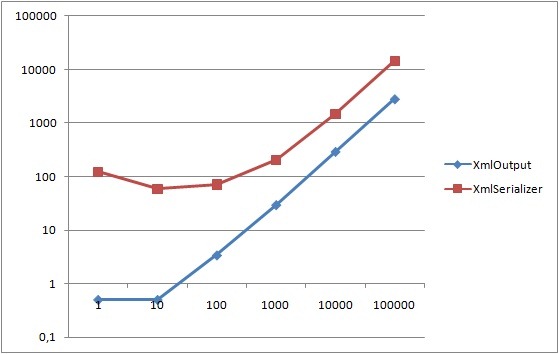
As expected, the XmlSerializer is somewhat slower on the low iteration numbers, this is due to the initial code emits XmlSerializer will do, as Kris also mentioned. This is also the reason XmlSerializer is actually speeding up as the iterations go up, the initial compilation is meaning less and less. XmlOutput has a rather linear use of time. Never the less, the initial compilation time is neglible as it’s only the first request that has this performance hit (and we could sgen followed by ngen this to avoid it). Thus, if we simply reset the timer after the first iteration, this is the new graph we get (note that we can’t plot the 1st iteration as a value of 0 cannot be plotted on the logarithmic scale):
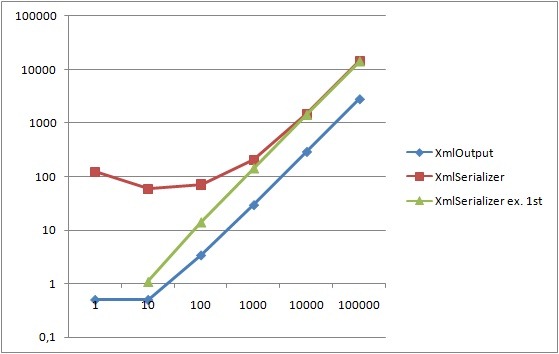
This time XmlSerializer behaves a lot more linearly like XmlOutput, but it’s still several factors slower than XmlOutput. In conclusion, speed does not seem to be the advantage of XmlSerializer. Depending on your scenario, using strongly typed classes might be more appropriate, but I really believe this is scenario dependent and thus I’ll leave that out of the discussion.
Downloads
SerializationBenchmark.zip - Sample code
Update
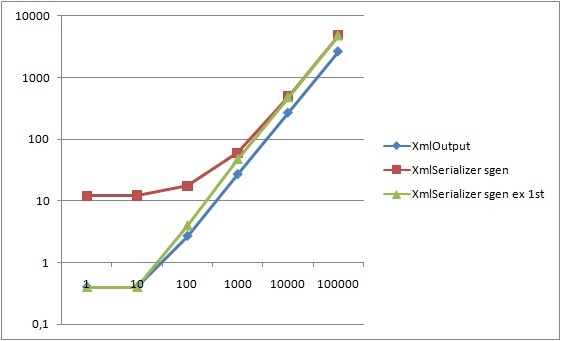
I misread Kris’ comment about sgen, I read it as ngen. I’ve removed my comment regarding this. To be fair, I’ve redone the performance tests, using sgen on the assembly during compilation. And I must say, it certainly does improve the performance somewhat of the serializer, though still not enough to compete with XmlOutput/XmlDocument.